Learn Northdeck in one afternoon.
Everything you need to set up your cockpit yourself: the first steps, every part of the app, and how to connect each system. No training day, no consultant.
From sign-up to your first MT meeting, in six steps.
Most teams do steps 1 to 4 on the first day. Steps 5 and 6 follow in the first week.
1. Start your trial.
Choose a plan and your edition. Your 14-day free trial starts right away. You get an e-mail to set your password, and your workspace is ready with the tables, KPIs and dashboards of your sector.
2. Connect your first system.
In the app, go to Data → Sources and pick a system. Follow the step-by-step guide for it below, or send an invite link to whoever holds the key. The first figures come in within minutes.
3. Check your data.
Data → Data quality lists what does not add up, such as an invoice without a customer. Data → Links shows how the same customer is matched across your systems.
4. Set your targets.
Under your workspace name → KPI library, open a key figure and fill in its target. From then on the overview says what is on target and what needs attention.
5. Turn on alerts.
Under your workspace name → Alert settings you choose who hears what: when a KPI goes off target, moves sharply or new payments come in. In the app and by e-mail.
6. Run your first MT meeting.
Open MT meeting: the agenda builds itself from what is off target. Record decisions and actions as you go. The weekly MT report goes out on Monday.
Alerts, actions, MT reports and the MT meeting are part of the Growth and Scale plans. See pricing.
Every part of the app, in a minute each.
Open the demo next to this page and try each step with sample data.
Overview
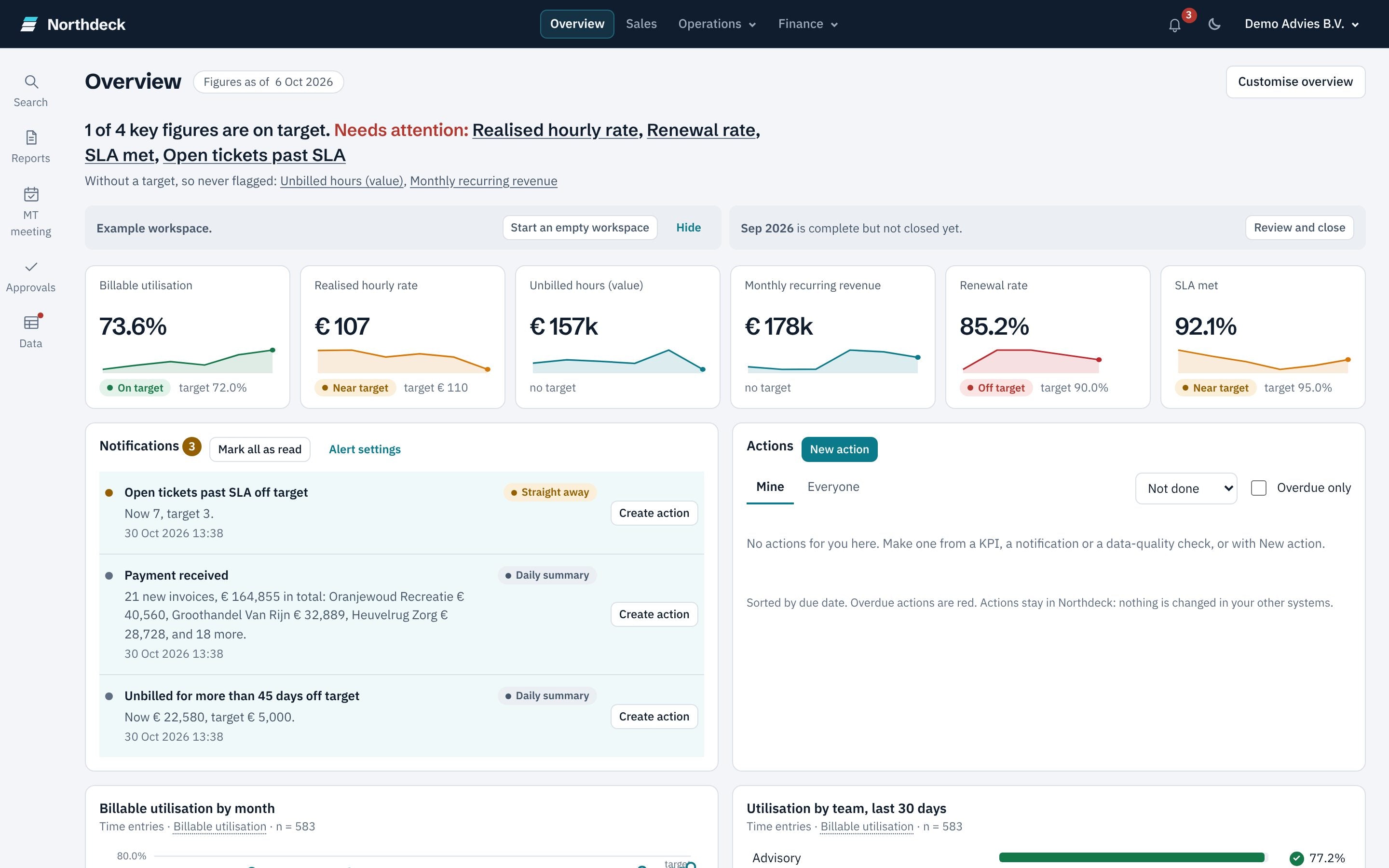
The first screen: your key figures against target, a sparkline per figure, and the alerts and actions of today. Customise overview chooses which figures you see.
From KPI to source row
Click any figure. You see how it is calculated, the subtotals by customer, product, location or any other field, and the rows behind it, down to the line in your own system.
Dashboards
One dashboard per topic under Sales, Operations and Finance. An admin changes charts, lists and targets with Customise dashboard, without building anything again.
KPI library
Ready-made KPIs you add with one click. Each one says which data it needs, what it found in your workspace and what is still missing.
Alerts and actions
A message when a KPI crosses its target or moves sharply. Turn any alert or figure into an action with an owner and a deadline, and see whether the problem went away.
Reports and MT meeting
Weekly and monthly MT reports, sent on a schedule or downloaded as Excel or PDF. The MT meeting keeps an agenda, a decision log and approvals with the figures next to them.
Budget & forecast
A budget per KPI and month, a forecast for the rest of the year and a 13-week cash view, next to the actual figures.
Closing the month
Close a month and its figures stay as you reported them, even when late data comes in. Closed periods shows reported against now, with the reason for any difference.
Users and roles
Settings & roles decides who sees what. Finance figures are for the MT and admins only. The app can be shown in English or Dutch.

Step-by-step guides per system.
Each guide says what you need, the steps, how the data stays up to date and what to do with a message. Every connection only reads; Northdeck never writes back to your systems.
HubSpot
About 5 minutes · you need a HubSpot admin.
Open the guide →
Pipedrive
About 3 minutes · you need a Pipedrive admin.
Open the guide →
monday.com
About 3 minutes · you need a monday.com admin.
Open the guide →
Shopify
About 10 minutes · you need the store owner.
Open the guide →
Moneybird
About 3 minutes · you need access to the administration.
Open the guide →
e-Boekhouden.nl
About 3 minutes · you need access to the administration.
Open the guide →
Stripe
About 5 minutes · you need a Stripe admin.
Open the guide →
Business Central
About 20 minutes · you need a Microsoft and a Business Central admin.
Open the guide →
Another system or a file
Mail info@northdeck.nl: a system with an API that is free to use is connected within 48 hours, at no extra cost. Until then, import a CSV under Data → Sources.
All integrations →
Someone else holds the key? In Data → Sources, click Send an invite link: they fill in the key without a Northdeck account. The link is valid for 7 days and works once.
Questions while you learn.
Do I need to install anything?
Can I try it without my own data?
Can we change the KPIs and dashboards?
Who sees which figures?
Does Northdeck change anything in my systems?
Where do I ask a question?
Ready to set up your own cockpit?
Start your 14-day free trial and connect your first system today.